Contents
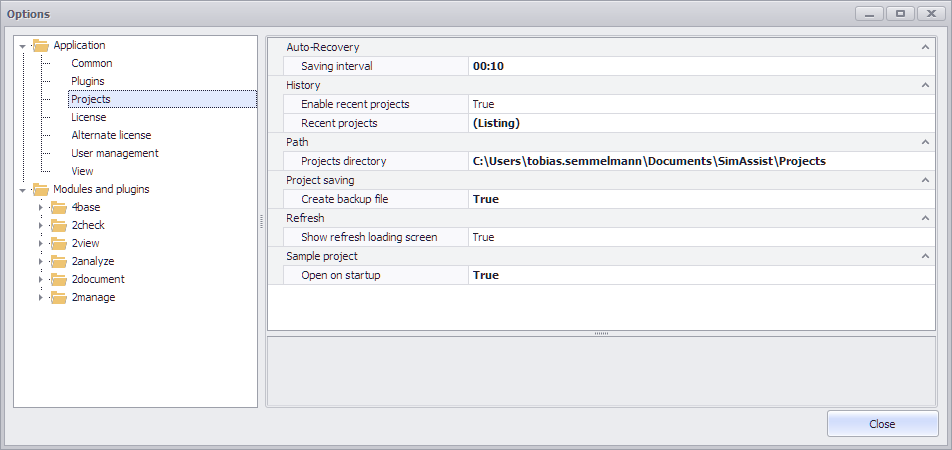
Figure 1 - SimAssist settings
You can access the settings (see Figure 1) by choosing Options in the frame application’s Main Menu. The settings are divided into the two following areas:
Option |
Description |
Application |
|
Language |
Specifies the language selected. The application needs to be restarted for the change to become effective. |
Logging |
|
Enable Logfile |
Enables (true) or disables (false) the log file. The application needs to be restarted for the change to become effective. |
Level |
Specifies which messages are to be logged. Only messages with the same or a higher level will be logged. Possible levels in ascending order are: Undefined = 0, Debug = 1, Info = 2, Warn = 3, Error = 4 and Fatal = 5. |
Logfile folder |
Specifies the folder in which the log file is to be created. If the field remains blank, the working directory will be used (EXE folder). The application needs to be restarted for the change to become effective. |
Paths |
|
Application directory |
Specifies the path to the application. The directory contains configuration files, plug-ins and templates. |
Helpfile |
Specifies the absolute or relative path to the help file. |
Settings file |
Specifies the path to the settings file. |
Option |
Description |
Messages |
|
Show scan errors |
Indicates whether an error summary will be shown after scanning for plug-ins, if any errors occurred, or not |
Search |
|
Disabled plug-ins |
Plug-ins that appear in this list are not loaded. |
Exclude |
Plug-ins will not be loaded if the plug-in name matches one of these regular statements: ".*" or "StartFileName*" or ".*EndFileName.dll" |
Include |
Plug-ins are loaded only if the plug-in name matches at least one criterion (regular statement) in this list: ".*" or "StartFileName*" or ".*EndFileName.dll" |
Scan sub directories |
Specifies whether plug-ins are to be searched for in sub-directories (true) or in the top directory only (false). |
Special version |
By default always the latest plug-in version is used when multiple versions have been found. This list overrides the default behavior. Any plug-in with a specific version defined in this list will be loaded instead of the latest version. Use: AssemblyName; Version Example1: SimAssist.Plugin.Base\1.0 Example2: SimAssist.Plugin.Base\1.1.1234.1234 In the first example the latest version which matches 1.0 will be loaded |
Source |
|
Plug-in directories |
Plug-ins will be searched in these directories. (Relative or absolute paths are possible) |
Upgrade |
|
On start |
Specifies whether (true) or not (false) new plug-in versions are to be searched for during start-up. If newer versions are available, the Plug-in Upgrade dialog box is displayed. |
Source path |
If a path is specified, new plug-in versions will be searched for in this directory when the Refresh function is used. |
Option |
Description |
Auto-Recovery |
|
Saving interval |
Defines the time interval ("hh:mm") at which recovery information on open projects is repeatedly saved. Recoverable projects are displayed the next time the application is started. |
History |
|
Enable recent projects |
Indicates whether recently used projects are listed in Recent projects or not |
Recent projects |
Specifies the paths for the last projects used. |
Path |
|
Projects directory |
New projects are created in this directory, of not otherwise specified |
Project saving |
|
Create backup file |
Creating a backup file (.bak) from the last saved project state when saving new |
Refresh |
|
Show refresh loading screen |
Showing a loading screen during a refresh of multiple plug-ins |
Sample project |
|
Open on start up |
Specifies whether a sample project should be opened on start up or not |
Option |
Description |
License type |
Specifies the license type to be used. |
Warn before license expires |
The number of days when a warning is displayed before the license expires |
License file |
Gets the license from a local license file. |
License file path |
Specifies the full path to the license file. |
License server |
Gets the license from a license server. |
Port |
Specifies the port number (blank for the default port). |
Server |
Specifies the name or IP address of the server. |
License server triad |
Gets the license from three license servers. |
Port |
Specifies each relevant port number (blank for the default port). |
Server |
Specifies the name or IP address of each relevant server. |
|
Information When using a WIBU dongle, please specify the license type License file and then the path to the relevant license file linked to your WIBU dongle. |

Option |
Description |
User management |
|
Database path |
Specifies the full path to the user management database. |
User management |
Enables (true) or disables (false) user management |
Option |
Description |
Favorites view |
|
Bold favorites |
If true, shows the favorites in bold letters |
Functions |
|
Plug-in focus |
When active, after selecting a plug-in in the project tree, this plug-in is activated and the focus is moved to the plug-in. When not active, after a selection the focus remains in the project tree. |
Pivot Chart |
|
Color palette |
The selected color palette will be applied to new Pivot Charts, once they are added to the project. The color editor can be opened using the three dotted button |
Title |
|
Show Project name |
Specifies whether the name of the project should be set in the form title or not |
Show SimAssist Version |
Specifies whether the SimAssist Version should be set in the form title or not |
 at the end of the line.
You can find descriptions of the options for the individual plug-ins under the directory entry for the relevant plug-in in the Modules and plug-ins chapter.
SimAssist saves all user-specific settings in an XML file (SimAssist.xml), which is stored in the user directory. The path to this file is saved in the registry.
Each time you launch the application, SimAssist checks whether a path is defined in the registry for the settings file and whether this file exists.
If it does exist, the settings in the file are used; otherwise, the template (from the %AppData% folder) is copied to the user directory and the path to this copy is entered in the registry.
This mechanism can be used to define default settings for all users, whereby the template has to be modified and can then be used to apply default settings to all users.
The following plug-in settings can be defined:
Plug-in Folders
A list of any desired number of directories that SimAssist should search for plug-ins.
<PlugInFolders>
<string>C:\ProgramData\SimPlan\SimAssist\VERSION x86\Plugins</string>
<string>...</string>
</PlugInFolders>
RemotePath
Defines a path that the Plug-in Upgrade dialog box searches for new plug-in versions.
<RemotePath>specify the path here</RemotePath>
CheckForNewVersionsOnStart
Specifies whether new versions are to be automatically searched for when SimAssist starts up (true or false).
<CheckForNewVersionsOnStart>false</CheckForNewVersionsOnStart>
InstanceLicense
Specifies the relevant licensing that is to be used and defines the license file or license server.
<LicenseType></LicenseType>
<LicensePath></LicensePath>
Option |
Description |
LicenseType |
|
LicenseFile |
Path to the license file |
LicenseServer |
Server IP or server name or Port@Server |
LicenseServerTriad |
Specification of 3 servers (like for LicenseServer), separated by semicolons |
EnableLogFile
Specifies whether a log file is to be written (true or false).
<EnableLogFile>true</EnableLogFile>
LogFileFolder
Specifies where the log file is to be written to. If the log file is enabled but no folder is specified, it will be written to the SimAssist user directory.
<LogFileFolder>specify the path here</LogFileFolder>
© SimPlan AG - Hanau District Court, Commercial Register (Part B) 6845 - info@simplan.de - www.simplan.de/en