Projects are managed in SimAssist at frame application level. To create a project, choose the button New in the main menu.
The dialog box for creating a new project then opens (see figure 1), in which you can assign the new project a name.
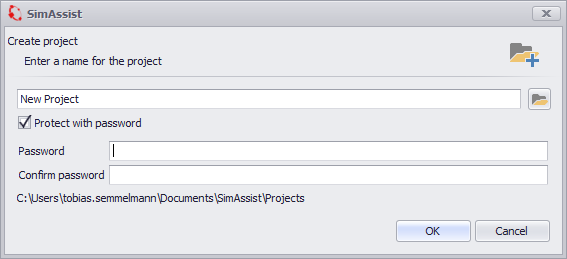
Figure 1 - Dialog box for creating a new project
In addition to the project name you can set a password optionally. Caution: After that the project can only be opened with this password.
The selected password must meet the following requirements:
•minimum length 12 characters
•three of the four categories: upper and lower case letters, numbers and special characters
Thereby a high data security can be reached. When you choose OK, the new project is created and is immediately available for use.
Now you can call the Project Properties via the Properties button in the main menu (see figure 2).
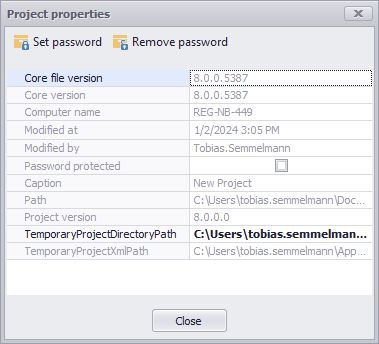
Figure 2 - Project Properties
There you can see information for example about the project path, the person who modified the project or about the SimAssist version, which was used for creating the project.
In addition there is the possibility to change or delete the password, if a password was set.
SimAssist saves the projects in an encrypted container with the file extension *.simassist in the project directory (see figure 3).
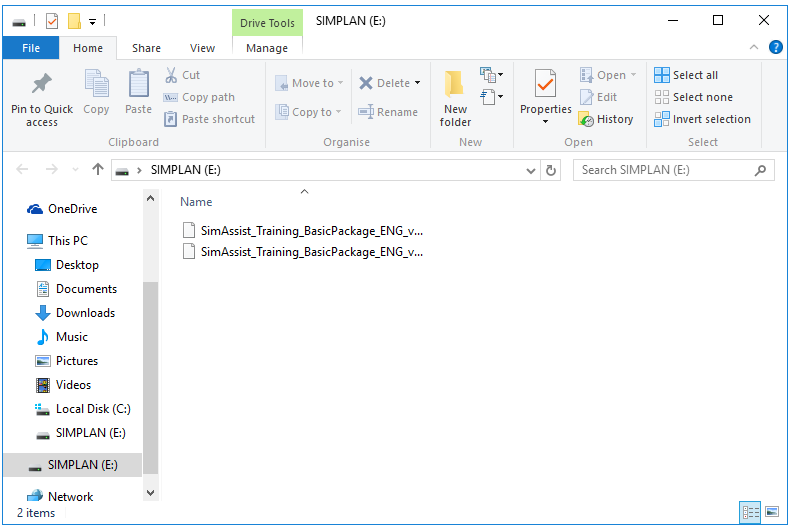
Figure 3 - Project container in the project directory
While saving a project, SimAssist creates a backup of the project named MyProject.simassist.bak. This file contains the last status of the project before saving.
In order to restore a backup, you have to remove the file extension .bak. After that the backup can be opened in SimAssist as used.
© SimPlan AG - Hanau District Court, Commercial Register (Part B) 6845 - info@simplan.de - www.simplan.de/en