In SimAssist projects are managed on the frame application level. In order to export a project, you have to use the Save as or Export button in the main menu (see figure 1).
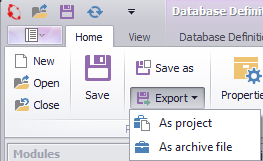
Figure 1 - Export buttons
Save as: Saves the current project with a new name.
Export:
•As project: Exports the project as *.simassist file
•As archive file: Exports the current project in a *.zip file
In both cases after pressing the Export button the windows explorer will appear. Here you can set a project name and choose the directory for saving.
Via the button Save you can finish the export process and the project will be saved at your desired location.
© SimPlan AG - Hanau District Court, Commercial Register (Part B) 6845 - info@simplan.de - www.simplan.de/en